Three blocks. One solid domain.
SPF, DKIM and DMARC are the foundations of your email. MailSolid watches them every day, tells you when one moves and shows you how to make it firm again.
- SPFCorrectWho may send for the domain.
- DKIMCorrectMessages arrive signed.
- DMARCAlmost thereOne new source fails. Review it and you can move to reject.
Sample data
Watch
Every day, every domain. If a record changes, you hear it first.
Explain
DMARC reports you can read in a minute, with your brand for your clients.
Firm up
The next concrete step, all the way to reject without losing mail.
What MailSolid watches
Everything that decides whether your domain can be trusted, in one place. Each finding comes with what it means and what to do.
- SPF
- Which services may send as your domain, and whether the record stays under the lookup limit.
- DKIM
- Which selectors sign your mail and whether the keys are published and strong enough.
- DMARC
- Your policy, the daily reports from Google, Microsoft and others, and every source that sends as you.
- MTA-STS and TLS reports
- Whether mail to you travels encrypted, with hosted MTA-STS and a place to receive TLS reports.
- Changes
- When a record changes, disappears or starts failing, with an alert where your team already works.
- Real messages
- Send a test message or upload an email to see how a receiving server judges it.
From the first check to reject
Connect a domain
MailSolid reads your public DNS and gives you a report address for DMARC. You stay in control of your DNS.
Read the guideUnderstand the findings
See what was checked, what failed and what is still unknown. Unknown is never shown as correct.
Read the guideFirm it up
Follow the suggested fix, check the result and let MailSolid watch for changes from then on.
Read the guide
A look inside
Real screens of a sample workspace.
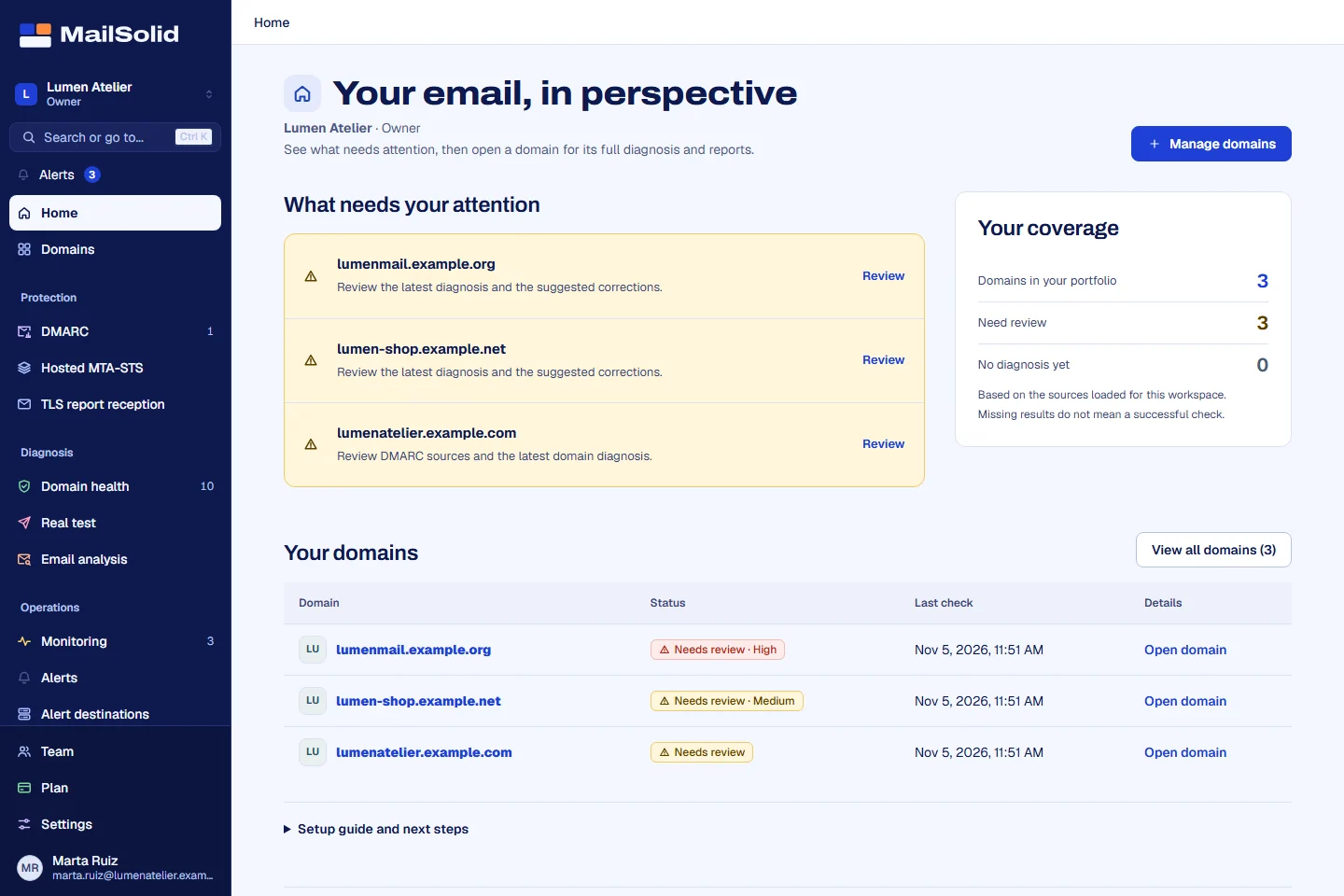
What needs your attention
The home screen puts the domains that need review first, beside your real coverage. Missing results are not counted as passing.
Read the guideOne verdict per domain, with the evidence
Each check explains what it found and how to fix it, with the exact DNS record to publish.
Read the guideWho sends as you
Daily reports turned into sources: legitimate services, sources to review and anyone sending in your name.
Read the guideTold before your clients notice
Alerts for new failing sources, worsening senders, spoofing and records that change, by email or in your team tools.
Read the guideA PDF your client understands
A clear report for every check, with your logo and colours when your plan includes it.
Read the guideCheck any domain, no account
The public domain health check and the real mail test are free, and you can embed them on your own site.
Read the guideReports that do the explaining for you
Your clients do not need to know what DMARC alignment is. They need to know whether their email is in order and what happens next.
Weekly summary
What changed, what improved and what still needs a decision, in one email.
Branded PDF
Your logo and colours on every report, depending on your plan.
Plain words
Every finding explained with its consequence and the fix, with the technical detail one click away.
For whoever looks after many domains
IT teams and providers who manage email for several clients.
- All your clients at a glance
- One view across workspaces with what needs attention first.
- Separate workspaces
- Each client keeps its own data, members, plan and credentials.
- Your team, with roles
- Owners, admins and members, with stronger verification for sensitive actions.
- Alerts where you work
- Email, Slack, Microsoft Teams, Google Chat, Discord, Telegram or your own webhook.
What you can count on
- We never send your mail
- MailSolid reads public DNS and the reports addressed to it. Your mailboxes and sending provider stay as they are.
- Unknown is not correct
- When there is no evidence, MailSolid says so instead of showing a green check.
- Accepted is not delivered
- A message accepted by a server is not a promise of reaching the inbox, and we never claim it is.
- Your data stays yours
- Each workspace is isolated, and you can export or delete your account at any time.
Start for free
Try it on your own domain before creating anything.
The free tools let you check a domain without an account. Creating a workspace takes a minute.
Pricing
Start free and move up when you need more domains, reports or AI credits. Prices come straight from our plans.
Initial
$0 forever
- 10 watched domains
- DMARC reports for 10 domains
- 200 email analyses a month
- 100 AI credits a month
- Hosted DMARC policy
Prices in US dollars, taxes not included.
Questions
Does MailSolid send my campaigns?
No. MailSolid checks and watches your email domain. Keep your mailbox and your sending provider.
Do I need to change my DNS?
Only to receive DMARC reports: you add our report address to your DMARC record. MailSolid shows you the exact record. Hosted MTA-STS is optional.
Does a clean result guarantee inbox delivery?
No. Authentication is one part of delivery. A result describes the evidence available, not a promise for every message.
Can I use it for my clients?
Yes. Create one workspace per client, invite your team and send them reports with your brand when your plan includes it.
What happens with my data?
It stays in your workspace. You can export it or delete the account from the console.
Every screen, explained
The help center walks through each screen with real examples.